Showing posts with label Websites Review. Show all posts

Tuesday, June 12, 2012

Fotobabble : A Website To Create Talking Photos

Fotobabble lets you create talking photos in two clicks. Simply upload a photo and then record your voice directly through your computer to create a talking photo. You can easily share it by e-mail, Facebook, Twitter or embed it into a blog or website.


Fotobabble takes photo sharing to a new level. Fotobabble lets you create talking photos in a matter of two clicks, to enhance photos you want to share with friends and family. Adding a voice…..your voice or perhaps your child’s voice, gives photos life and creates a memorable experience for someone in the process.

Imagine sending a photo while on safari to your friend that is captioned by your voice telling her how you felt the moment you first saw the lion?

Imagine sharing a photo of a 70th birthday party with family on the other side of the world with their voice as an overlay to a shot of their great grandchild sitting on their lap?

Imagine sending a photo to your boyfriend or girlfriend of yourself while adding a romantic or fun message to an image of you standing in front of a sunset?

Imagine adding voice to an event invitation telling your guests about the band you just hired or a book group invite sharing a teaser about the book in two lines?

Simply upload a photo and then record your voice directly through your computer to create a Fotobabble. Then share it by e-mail, Facebook, Twitter or embed it into a blog or website.

It’s free and all completely web-based. No software to download, just register and get started in seconds.

How To Create Talking Picture ?
1. Just signup a free account on fotobabble

2. Insert a title, add a image and click next

3. Now click record and speak into the built in microphone of your computer.

4. Once you have done, click stop and play your voice. If you’re not able to hear your voice, check your volume is turned on and also make sure you have the latest version of Adobe Flash.

5. Add tags and you can also choose your project to be public or private.

6. Save it and it’s ready to share.

7. You can embed in your blog or website, share with your facebook, twitter friends etc.

Visit Fotobabble

MassMirror.com : Upload any file on some of the top free hosting services automatically.

MassMirror.com allows you to send any file (max 1gb or 1,000mb) Send images, music files, movie files, and more to anyone for free! Your file will be distributed on some of the top free hosting services automatically. Simply upload your file to MassMirror.com. Your file will receive a custom url for your recipient to download! It's that simple!


This free service allows you to upload any file (image, music, documents, and more.) for free to the Internet. It is great for distributing files to your friends, family, or co-workers.


This technology enables you to upload your file to our servers with a real-time progress bar. Your file will then be saved and stored on the free hosts we support. Then simply share the url to anyone with access to the world wide web. You can even use this service to mirror file downloads from your own site.

This is one of the most advanced, most compatible, quickest, and easiest upload services on the world wide web and we are always improving.

CarryoutText : A Website To Convert Text to MP3 Files

CarryoutText is an easy to use service that converts your text to a MP3 file for you take with you! It converts English text to a downloadable MP3 file that you can listen at the computer or with your MP3 player.


There are two choices for converting your text to an MP3 file: You can either upload a Word, PowerPoint, PDF, XML, TXT, CSV or HTML file, or you can paste text directly into the converter.


Larger files take a few minutes to convert to MP3 files. For the 30, 971 character file we pasted, it takes about 4 minutes. A Please Wait screen appeared during the wait.


Visit the Website HERE

Convert Text HERE

gifsoup.com : A Website That Convert YouTube Videos to Animated GIFs

Why would we want to turn a YouTube video into a GIF? Well, GIFs upload easily onto personal Web pages on places like MySpace. Instead of having to click on the entire embedded video and waiting for it to load, your followers will see the GIF as soon as they click on your page.

GIFs have limitations, though. Since a GIF is really just a series of images played in sequence, these images are often very large and may take time to load on slower internet connections. For this reason, GifSoup limits us to 15 second video clips.


The process to make a GIF is easy. First, paste a URL into the box under the words Create Animated GIFs from YouTube Videos. Then click the yellow button that says Create GIF.


The site then prompts you to register. If this is your first time using the site, you will need to create a user name and password. Click Register when you are finished.


Your video will then load into the video maker. You can play your video in the player at the top of the screen, then click the Start Time button to start recording frames for your GIF and the End Time button when you are finished. You can restart these multiple times, so making a mistake is not a big deal. Remember: you can only record 15 seconds.


Give your GIF a category and title. If you want to keep your GIF private rather than sharing it with other GifSoup members, put a check in the box next to Private. When you are ready, click Preview to view your GIF. Your GIF will appear at the bottom of the screen. If you like it, click Finish. Otherwise, you can keep playing with the start and stop settings until you do like it.

GifSoup then displays choices for using your GIF. You can give a direct link to the video, copy a code to paste the video in a forum, email or Web site, post the video directly to your favorite social networking site, or download it in either small or original size.

GifSoup does exactly what it claims to do. You can turn a YouTube video into a GIF in just a few seconds with little effort. While we struggle to think of a professional use for this (since there is no sound in a GIF, and GIFs have largely lost popularity in the past few years), it is fun to turn comical video into an animation to share with friends.

Visit the Website HERE

Vidinotes.com : Makes printable image notes (eg. pdf) from video

Do you want to take screenshot from a video? And then customize images extracted from the video with custom title and description. Also, make a printable file or generate PDF file containing those customized screenshots. Ideally, you will need heavy loaded software for such image capture and editing routine. Now you can do all this online without need to install any software at Vidinotes website.


Vidinotes.com was founded to expand the use of online videos. While online videos provide entertainment and understanding, learning from videos is not very practical. Vidinotes is the bridge from video to learning, allowing users to create their own notes of a video, including images taken directly from the video, then print or save their new document.

How To Make printable image notes from video ?
1. Open Vidinotes website in the browser.


2. Click Browse button to select and upload FLV video file (upt 25MB) for capturing screenshots. You can download any online video like Youtube, Dailymotion etc and use with this tool to extract image screenshots from that video.

3. Then capture images (upto 30 pics). Also add titles and descriptions to images. Give a title to your Vidinote.

4. You can generate PDF file containin screenshots with descriptive text or send it to printer for hard copy format.


Above is an example screenshot of a PDF file screenshots captured and edited using vidinotes tool. For sure easy to use tool for not so easy process of captuing and editing screenshots. Try it!

Visit Vidinotes.com HERE

Monday, June 11, 2012

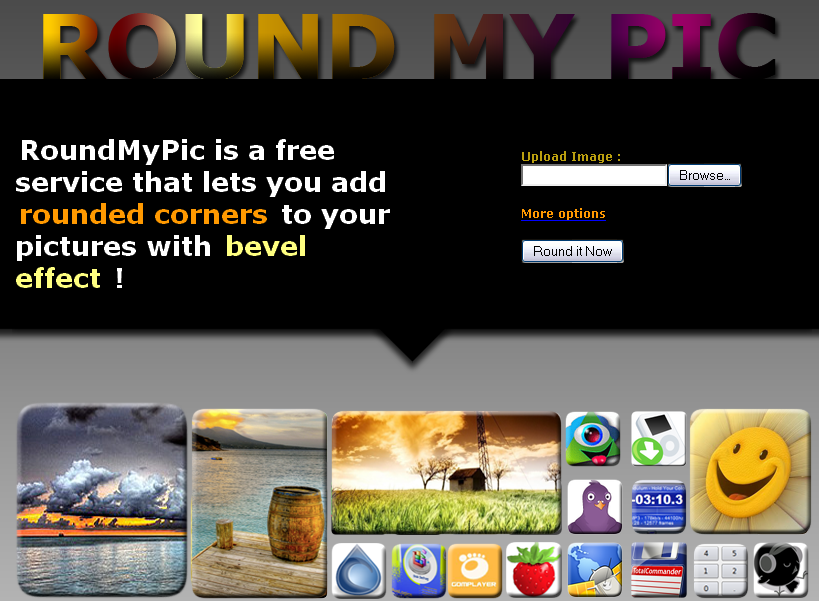
RoundMyPic.com : A Website that lets you add rounded corners to the pictures with bevel effect

 I know many of you like to make your images better by adding rounded corners to them. This can be done with any photo editing software like Photoshop and GIMP but why go through the time-consuming heavyweight software when you can do it online within seconds?

RoundMyPic.com is a simple online tool that lets you add rounded corners and bevel effects to your pics. Simply upload an image from your computer and click ‘Round it now‘. You can also give your image a new width and height and choose not to have a bevel effect. You can also specify a round size for your image. The resulting image can be easily downloaded to your computer.

 First, go to RoundMyPic.com. On the right of the screen, click the button that says Browse to upload the image. Select the file you need to make it round edge and click Open. Click the button that says Round it Now. Your photo will then upload. This may take a minute or so, depending on the size of your picture and your internet connection speed. After your picture uploads, scroll to the bottom of the screen and click the yellow Download button. Choose the location on your computer where you want to save your file and click Save. You now have a picture with rounded edges, ready to use in a PowerPoint presentation, on a blog, or anywhere else you want.


Resizing a picture before giving it rounded edges is just as easy with RoundMyPic.com. On the first screen where you upload your picture, click the link that says More Options. Several options are now available. You can choose a new height and width for your image, how large the rounded edges should be or you can turn off the bevel effect all together. The options are in pixels, so choosing a new image size may take a bit of guessing to choose the right size for your image, especially without a lock aspect ration option. Once you have made your selections, just click Round It Now to see your results as shown below:

Note: Regardless of original picture format, Round My Pic’s results appear as a PNG.

Visit RoundMyPic.com HERE

convertpdftopowerpoint.com : Website That Converts PDF Files To Powerpoint Presentations

Many instruction manuals and other online reference content are saved as portable document format (PDF) files due to the file's small size and ease of use with the appropriate PDF reading software. Microsoft PowerPoint (PPT) slides are frequently used in presentations as a reference point for the speaker. While pages in a PDF file may be relevant to use in a PPT presentation, the original source material might not be available.


Ever imagined you could edit that pdf file and reuse it again? Well, here is an online tool that helps you achieve this. convertpdftopowerpoint.com is an online tool in which we have to upload the PDF files and in return it’ll email the converted files back to us. The site helps you to easily use the unusable information from presentations and edit them in power point. Once the formerly PDF file is converted into an editable form, the user can easily edit the styles, font and other important content. This lets you make changes in former presentations, update information and even copy-paste information from other documents in other formats.


Covertpdftopowerpoint.com is a free service where you can upload your uneditable files, a copy of which is sent to your E-Mail account in editable format. Download the editable file from your account to your PC and here you are, you can easily edit the file. The layout of the PDF file is retained in the newly created Powerpoint presentation. This tool replicates the text and images to the Powerpoint presentation in the same layout as it was in the PDF file.

Convertpdftopowerpoint.com, is useful in converting your pdf file into powerpoint, retaining the original layout (including text and pictures, if any). With this conversion the user can easily edit the information and reuse it.

Friday, May 18, 2012

freemypdf.com : A Cool Website To Remove Printing Restrictions and Passwords from PDF Files

Hey my friends, do you have textbooks, ebooks in PDF format? And, unfortunately most of these e-books have restrictions on their pages from being printed, and forget copying any text from the PDF. So, no real studying, with a highlighter and notes in the margins, can ever occur. At least, not without breaking the restrictions on the PDF.


Don't worry a website exists to break all the restrictions from print limits to passwords imposed on PDFs. freemypdf.com is the wesite that does this for you.

First, click the Choose File button and select the PDF from which you want to remove restrictions. Then, click the Do It button. You are then prompted to save the new, free-of-restrictions PDF to your computer. Choose a location for your new file, then open it and use it however you like!


There are a few restrictions for FreeMyPDF.com. First, you must be able to view the PDF without entering a password for it to help you.

Second, there is a file size limit of 7MB. Finally, they ask that you not use the site to do anything illegal. They do not elaborate on what they define as illegal (or immoral), but they do not take any responsibility for your PDF-freeing activities.

Visit The Website HERE

GrabOut : A Website That Capture and Upload Screenshots

GrabOut is a light and easy-to-use screenshot capture program that allows you to capture you screen or a part of it and then automatically uploads it to the GrabOut server. You will then be provided with a link that you can use to show the screenshot to your friends. This application let's you grab (capture) a piece of your screen. The image is then automatically uploaded to the GrabOut™ server by the application and it instantly returns a URL for you to quickly share the image with your friends.

Open the downloaded file and follow the installation instructions. Once finished, you will be presented with this screen:


To grab a section of the screen, click on the green Grab now button. Then choose a section of the screen that you want to grab or capture. The program will return a white screen with a message that tells you to wait for a moment as the program uploads the captured part of the screen. After a few seconds, the ‘Grab now’ message on the user interface will be replaced by a URL. Click on the Go button and you will be taken to the capture’s GrabOut page.

GrabOut is a free software that is less than 500k in size. The program is convenient to use but it is rather limited in features. For one, it is more difficult to capture precisely what you want without a zoom feature that allows you to magnify the points where you want to start and end the capture. It is easy to get something that you might not have intended to capture.

Visit GrabOut HERE

Download GrabOut from HERE

Tuesday, May 15, 2012

LockItTight.com : A Website That Helps To Find Stolen Netbook/Laptop Location

Today's computers are more portable than ever. Your laptop, netbook, or smart phones are with you everywhere you go - office, school, airport, bus, train, coffee shop and parks.

At the same time, your computer stores more important data than ever - family photos, kid's video, business and personal emails, work documents, school paper, and so on.

Can you afford to lose your computer? Besides the dollars you shelled out on it, can you afford to lose the data on your computer? Can you afford to have your personal information (name, email address, home address, cell phone number, your baby's photo and more) be leaked to someone you do not know, most likely criminals?

With LockItTight you may have the peace of mind.


After you sign up the absolute free service, and install the client software on your computer, the client software will consistently report locations, screen and webcam shots from your computer to the servers of LockItTight.com. And you can access the reports from any computer .

In case your computer was lost or stolen, you will be able to find where is your computer, who is using it and what he/she is doing with your computer. With all these evidences provided to police, the chance of retrieving your lost computer will be much higher.

If you are concerned about privacy, there is a device configuration page on which you may choose to turn off screen captures or webcam captures as soon as the client software is registered with LockItTight server. You can always enable these features and monitor your computer after it is lost or stolen.

In the near future, this site is going to lauch some services like ... you will be able to retrieve data from your lost computer, safely delete data on your lost computer remotely, and monitor the keystrokes and clipboard activities from your lost computer.

Visit The Homepage HERE

CanYouSeeMe.org : An Open Port Checking Website

CanYouSeeMe.org will serve as a free utility for remotely verifying a port is open or closed. It will be useful for users who wish to check to see if a server is running or a firewall or ISP is blocking certain ports.

The interface is simple, Your IP address is identified and just enter port number that you want to check.

Most residential ISP's block ports to combat viruses and spam. The most commonly blocked ports are port 80 and port 25.

Port 80 is the default port for http traffic. With blocked port 80 you will need to run your web server on a non-standard port in conjunction with a port 80/web redirect from No-IP.com.

Port 25 is the default port for sending and receiving mail. ISPs block this port to reduce the amount of spam generated by worms on infected machines within their network. If you need to send legitimate email and your ISP blocks port 25 than consider the solutions from No-IP.com.

Open Port Check tool is a free tool provided by No-IP.com. If you are having problems with your ISP blocking ports including port 25 and port 80, No-IP has a solution.

You can even go through checkip.org which lets you to find your current IP address and additional information including maps and location info.

Visit CanYouSeeMe.org HERE
Visit no-ip.com HERE
Visit checkip.org HERE

Name That Color : A Website That Find Name of Any Color with Name That Color

Below is the color given....can u name it??? Difficult to tell isn't it? Given a shade of color to me like Cornflower Blue, I would call it nothing but Sky Blue. Being a typical guy, I have no clue what the colors Lavender and Mauve look like. You can show me Indigo and I won't know if it's more like Violet or Purple. So if your situation is also similar to this or in case you need what is the actual name of the color you just came across, then this website would surely help.


The application is called Name That Color and is developed by Chirag Mehta, which helps people to create a color on the screen (or copy-paste CSS hex# color) and find out the name of the closest matching color. Either you can get to know the name of the color using the hex codes or create your own.

In case you wish to know the name of the color that you just saw somewhere on the screen, then the tool published yesterday called ColorPix would help. Using that tool you can first find out the hex code of the color and then using that code you can actually get the name of the color that you came across.

There are so many, in fact more than 1500, colors that finding the names to all of those would be difficult, so you can also play with the drop down menu provided in the application itself.

Visit Name That Color HERE

How To Print Documents to any Printer in World ??

With PrinterShare® you can print documents and photos on other people's printers as easily as on the one connected to your machine. No special technical knowledge is required from both - printer owner and user. It just works!

With PrinterShare® you can share your printer in less than a minute and let other people connected to the Internet (your friends, relative and colleagues) print paper documents on it. You don't need to know or deal with specifics of network sharing, complex settings and figuring out Windows access rights.

PrinterShare software automatically detects printers connected to your computer including local network printers. As long as you can print in it yourself, you can share the printer and let other people use it.

Check HERE for "How PrinterShare works?"

Download PrinterShare for Windows from HERE

Sunday, May 13, 2012

How To Generate Terms of Service and Privacy Policy for your Website??


What is Terms of service?
Terms of service (commonly abbreviated as ToS or TOS) are rules which one must agree to abide by in order to use a service. Unless in violation of consumer protection laws, such terms are usually legally binding. Terms of Service can also be referred to as Terms of Use or sometimes merely a Disclaimer, especially regarding the use of websites.

Certain websites are noted for having carefully designed terms of service, particularly eBay and PayPal, which need to maintain a high level of community trust because of transactions involving money. Terms of service can cover a range of issues, including acceptable user behavior online, a company's marketing policies, and copyright notices. Some organizations, such as Yahoo!, can change their terms of service without notice to the user base.

A ToS violation can result in myriad consequences towards those who are guilty depending on the service and the severity of the violation. Most organizations reserve the right to restrict a user's access to the service if they violate the terms in the agreement. In more serious cases, the user will have his or her account terminated.

What is Privacy policy?
A privacy policy is a legal document that discloses some or all of the ways a party gathers, uses, discloses and manages a customer's data. The exact contents of a privacy policy will depend upon the applicable law and may need to address the requirements of multiple countries or jurisdictions. While there is no universal guidance for the content of specific privacy policies, a number of organizations provide example forms or online wizards.

So what do you do if you have just started out as an entrepreneur of your website and want a ToS/PP of your own? I checked onto links on Google which gave me what I really wanted. A Terms of Service Generator! Some of the links have been provided here, Check them out.


There are many more...you can search them in GOOGLE.  

Source: en.wikipedia.org

Voxli - A Free Website For Voice Chat

  
If you are looking for online voice chat without wanting to share your skype or Gmail ID, then Voxli is quite perfect.

Features:
  • Voxli is the easiest way to voice conference online.
  • Voice chat with up to 200 people at a time.
  • Never leave the browser - no large download, no server setup.
  • Invite your friends by sending them the URL of your voice conference through email or instant messenger.
  • Use push to talk to control when you are speaking even if you are outside the browser.
  • Voxli is free for all group sizes during open beta.
  • Compatible with Windows and Mac.
  • Voxli is compatible with all gaming headsets.
Note: If you install the voxli browser plugin, you get HQ (high quality) audio.

Source: voxli.com

Visit the site Here

PDFaid : A Website That Watermarks, Splits, Joins and Converts PDF Files


PdfAid.com is a Free service that provides a series of pdf tools to help you make amazing and useful changes to your pdf files Online. These tools donot require you to install any software on your computer. The interface is easy and intuitive to use. PDFaid can perform many things on our files like we can split a PDF file into many files, join the PDF files in one, watermark our PDF files with some text of our choice or convert a doc into the PDF format. It is a simple and single tool for most of your PDF requirements. 

Although the tool is not completely free but you can use the utility with some size restrictions on the site.

Visit pdfaid.com Here 

Source: pdfaid.com

FlipTwits : A Website That Flips Text for Twitter


How to write upside down on Facebook, Twitter, Myspace, YouTube, Blogs, Forums. Type in your text and and just see the result with this website called "fliptwits.com". It's cool! It is specially designed for maintaining flip texts for tweeting. You can copy your flipped text and paste it anywhere you want. This text effect can be used almost anywhere.

To flip text simply enter it the first box. Your words will be flipped upside down in the second box. click on “Send Flip Tweet” button below. The service will ask you for the Twitter login (safe to provide). Enter the information and click Allow. Your tweet will be published on your account flipped upside down.

Visit The Website Here 

Source: FlipTwits.com

WinPing : An application That Ping and Test The Internet Connection

WinPing is a tool that has been designed to enhance the basic pinging capabilities of Windows. Among the additions are: Infinite looping pings, Multi-ping, adjustable number of retries, Displaying of information about hosts, and saving the ping results in a log file.


Enter a web address or a valid host name, e.g. http://www.google.com or google.com, or a valid IP address, e.g. 98.137.149.56 (IPv4) ,[2a00:1450:8006::93] (IPv6). The IP addresses are converted into host names and conversely. An empty input gives local IP address.

The button "Options..." opens the WinPing options: Infinite Loop (runs pings in a infinite loop and shows the average in real time), Time options (Timeout, Temporisation between every ping in milliseconds), Multiping (for several pings one after the other), Retries, Average of the response times, Hostname List, ip-to-country File... Sort and Replace utilities will allow you to edit and save host name list, countries list or any text file.

The "Auto-Save" option will allow you to save thousands of lines of pinging information (in Infinite Loop Mode).

A Ping Graph (with axis scale and Y-offset adjustment) allows you easily to view, in real time, Average and Pings points for every loop. You can easily save and load the Ping Curves using the Graph Options.

This version updates ping error messages, and updates IP address pinging. Now you can ping an IPv6 address, and you can show all resolved IP addresses of a domain name.

This program works with all version of Windows. If your system is Windows XP or older, it requires the Microsoft .NET Framework version 2.0 or higher.

Pros
A ping is essentially a utility that is already part of most OS including Windows, that can be used to detect connectivity. This is done by sending out a message to a remote host (IP address, or URL / alias) and hearing for a reply. This process is called pinging after the nautical term which describes a similar process of sending a ping and hearing for a reply.

Cons
It does little to add to the existing Ping application in Windows, except for adding a couple of options such as infinite pinging and logging of each ping. Neither of this is of much use for anyone, including hardcore networking people. Extra information about a host can be gotten from a WHOIS query. It is not at all clear why this information is required as part of the Ping reply. Basically, this tool will be useful for a person who is specifically interested in trying out various flavors of pinging and not for too many others. If the application had supplied a trace route feature or a link to a trace route server then it could possibly be much more interesting. But even then there are web based applications already available for that purpose. For basic network troubleshooting the in-built Windows ping application is more than sufficient. Thankfully, this is freeware, so enthusiasts can try and play around with it to their heart’s content. Users should be aware that there will be run-ins with their Firewall / Network Security suite when using pings, disable those before you can receive them.

Download WinPing from Here 

Source : patrice-zwenger.co.cc

KeepMeOut : Website That Solves Your Internet Addiction.


I am very much addicted to YouTube, FaceBook, Twitter and blogs, well others may be addicted to many different sites of their interests. If you are a worker or an online entrepreneur, this can be an even bigger problem, because it will decrease your productivity and possibly your bottom line. You keep telling yourself you have to get started on your work instead of visiting these sites, but every time you sit down at your desk and open your laptop, you keep getting distracted.

How to solve the problem? I believe that the most efficient way is to stop, think, and try to become more disciplined over time. If that is not working, however, you can try KeepMeOut.com.

KeepMeOut creates custom, timed bookmarks that give it to you straight when you're visiting a site too frequently. What you need to do is just add the URL of the site that is consuming your time, and then the service will provide you with another URL that you should use to access the service (You should bookmark it and always use it). If you try to access the site more than once within a specific time interval, say 60 minutes, they service will block you and remind that you should wait some time before you can go there again.

Visit KeepMeOut Here

Source: KeepMeOut.com

Barcode Yourself : Website That Makes Individualized Barcode Information


The series of lines on virtually everything you can buy today is called as a UPC (Universal Product Code), more commonly known as The Barcode. The original barcode was patented in 1952 and started out as a combination of concentric circles rather than the lines of varying thickness that we recognize today.

The invention of the barcode is responsible for speeding up checkout lines and allowing for easier inventory management. No longer does a cashier have to search for the errant price tag to key in the amount manually.

Literally anything can be barcoded. Have you ever wondered what you're worth?


Barcode Yourself is a complete, interactive experience in the series of barcode art, created using the personalized data of participants. Enter an individual's gender, weight, height, age and location, and the barcode is formed using real-world data. The system assigns you a price value based on age, gender, location, height and weight, much like an insurance company would calculate risk assessment or longevity.

The individualized barcode can then be printed, mapped, scanned, even depicted on a t-shirt or coffee mug.

It is in scanning a barcode that the project reveals its humor, like a banner that reads: Disclaimer! Human beings are not merely worth somewhere between one cent and 10 dollars. With the complexity of mocking self-identity, Barcode Yourself lays out a fresh absurdity in the modern world of consumerism.

Visit Here To Barcode Yourself.

Source: barcodeart.com